Showing posts with label eLearning. Show all posts

Wednesday, January 1, 2014

File > New Year


Today, this first day of 2014, I decided to do something I've been meaning to do for quite a while - create some hand crafted art for the hell of it. That's what the image above is.

Most applications from Photoshop to Word start a new document by going to the "File" menu and choosing "New". I found it oddly refreshing to take that concept offline and cut letters out with an X-acto knife. Here's to all the new beginnings and blank documents this year will open for each of us. 

It's hard to believe 2013 already came and went. Here's a recap of all the eLearning related milestones I reached last year:
  • Attended my first DevLearn conference
  • Started a local eLearning meet-up for the Columbus, OH area
  • An article I wrote was featured in ASTD's T+D magazine
  • Presented at an internal company conference on PowerPoint prototyping

Despite my full time job, a steady stream of freelance projects, and family responsibilities, I somehow also managed to publish 9 writings in the past year. 

Thursday, November 7, 2013

How to Easily Transcribe Audio and Video by Hand

It’s nice to see more online video services like Panopto, automatically transcribe video and make them searchable. Nice, but usually pricey and locked down as a proprietary service. 

For the rest of us on a budget, developing audio and video based training with closed caption style transcription requires a typed text transcript. However many times, I’ve used audio or video for a course with no pre-typed script. 

This meant I had to simultaneously listen to a media file and frantically type out whatever was spoken. I could type a sentence or two down before the audio got away from me. Then I’d have to stop, go back a few seconds, and listen again. I’d repeat this over and over again, seldom rewinding to exactly where I needed to replay. 

The whole process took an annoyingly long amount of time. Eventually I figured out a simple technique: Slow down playback to a comfortable typing speed.

First off, download VLC for video playback. It’s a free, open source tool that will save you the headache of opening video and audio files in different slower loading players like Windows Media Player or QuickTime only to get error messages about unsupported codecs or file formats.

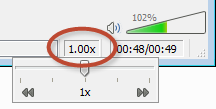
One of the capabilities of the VLC player is controlling the playback speed right from the main window. Adjust that down to somewhere between 0.25x and 0.5x speed depending on your typing abilities and how fast the speaking occurs.

You’ve now entered what I affectionately refer to as “drunken narration” mode (You’ll understand why during playback. This is particularly fun if it’s a video is of a co-worker or high ranking executive. J). This reduced speed lets you type at a comfortable pace without having to continuously stop and start the video to listen again to short bursts.

After I type out a video’s transcript with this method, I replay at 1x speed and double check my text for accuracy.

Bonus Tip: If you like to listen to Podcasts, TED videos, etc., try downloading a file of the media and playing it back with VLC at a faster speed (1.25x or 1.5x, or even 2.0x). You’ll save time, and get up to speed on your podcast library much quicker. I've noticed beta versions of YouTube and Lynda.com HTML5 players also currently allow speed changes.

Wednesday, January 30, 2013

The Ghost of eLearning Future

During my 5+ years as an eLearning developer, I've continually wondered what our industry would look like if we didn't become entrenched in decade(s) old bad habits. What if we could truly embrace advances in web design and development, and not insist on CD-Rom era course structures and flashy... Flash?

Sure, we'll probably always be a bit behind the times, but glossaries? Tables of contents? Locked linear navigation? These kinds of book navigation metaphors were all hold overs from an era before the Internet went mainstream and people became comfortable with web technology (like scroll bars). The familiar concept of a book was a mental anchor secured in reality while one trekked into the scary unknown technology realm of the early 1990's. To me, this is as outdated a navigation structure as AOL keywords, so to still be using it so heavily in 2013 is beyond absurd. Yet it's unchecked prevalence is overwhelming.

Then, just when I had almost forgotten what it was like to be inspired as an eLearning developer, I came across Snowfall, a New York Times multimedia feature experiment. If you haven't, I highly recommend taking a few minutes to truly delve into it's splendor.

Each time I view compelling web content like this, it's like a visitation from the Ghost of eLearning Future to warn of all the cool stuff we'll miss out on if we continue our same tired old habits of eLearning past. I'm far from the first to say so, but nothing ever seems to truly shake things up.

Here are my main take-a-ways from the Snowfall piece:

This is what real HTML5 looks like.
Forget the marketing hype (or flat out lies) many vendors proclaim about tools publishing to HTML5. THIS is what HTML5 (and related web technologies) can do. We should expect nothing less for eLearning. To be fair, vendors are breaking new ground with HTML5 publishing options, so they need some time to work out the kinks. However, to only focus on replacing PowerPoint to Flash conversion with PowerPoint to HTML5 conversion completely misses the point in my opinion. Ditch the slides. Embrace the scroll.

This is the future of consuming content online.
Compelling storytelling. Well thought-out visual design. Multimedia content that reinforces text. Responsive page layouts and content (adapting to a whatever device screen viewed on). All of these work beautifully together, as they should. This is the future of web content, and it's wonderful. Let's get on board before we're left at the station.

This is what eLearning could and should be!
I'm willing to accept that as an industry, eLearning development will always lag behind cutting edge technology trends and even take a while to adopt established best practices. However, I'm not comfortable repeating the same past mistakes. In my opinion, we should push to make this new kind of content delivery a reality.

Friday, January 11, 2013

Unconventional eLearning Simulation

Last year during the Articulate Storyline beta, I created an unconventional "eLearning" simulation.

Since I typically spend work days creating conventional corporate training courses (sales training at the time), I wanted to try something completely different and also experiment with some ideas:

What if the goal of a simulation was to do tasks incorrectly? Could that actually reinforce correct behavior?
  • What if avatars were jerks and gave you bad advice?
  • What if you were yelled at and insulted instead of monotonously encouraged and congratulated? 
  • Could an eLearning authoring tool be used to tell an interactive story?
Somewhere in the recesses of my imagination, I came up with Carl's Clunkers, a sleazy car salesman simulation. 

As you'll see, the high quality images of people from eLearningArt played a strong role. All of the sources of the assets used are listed at the end.
Post a comment if you have any feedback or questions about how I made this unconventional simuation.

Saturday, January 5, 2013

Moving into 2013

2012 was a huge year for me personally. I started a new job in August, became a father (again) in September, and achieved several personal goals I set earlier in the year including running 5k.

As far as eLearning, I was involved in both the Articulate Storyline and Lectora 11 Betas, and posted several eLearning related blog posts on other sites last year (often to the neglect of this one). Here are all 13:

Musings:
Realizing the Potential of the Tin Can API

Product Reviews:
3 Defining Features of Articulate Storyline
ReviewLink: Online Review Tool for Lectora

Effective Visual Design Series:
Part 1 – Being an Advocate for Good Design
Part 2 – Solving Problems Visually
Part 3 – Choosing Colors, Fonts & Images

eLearning Development Tips:
Using White Space for Clutter-Free eLearning
Keeping eLearning Readable – Visual Readability
Call to Action Items in eLearning

Lectora Tutorials:
Extending Lectora with an iFrame
Lectora Best Practices Part 1 – Optimizing Preferences
Lectora Best Practices Part 2 - Variables and Actions
Lectora Best Practices Part 3 – Using Text

I'm looking forward to 2013. I'm planning to step up my game on several fronts when it comes to my work. So far things are going great. Hopefully you are off to a good start into 2013 as well!